
A website preview can restrict who may open it, or instruct search engines not to show it in results. Those are different decisions. A public page using noindex can still be opened through its link; an indexing instruction is not an entry gate for readers.
Before sharing a preview, decide who needs to review it and what they may see. A draft public catalogue has different requirements from a page containing customer records or internal processes. Choose the arrangement according to the content and review workflow, then make sure the team’s terminology means the same thing to everyone.
Ask two different questions
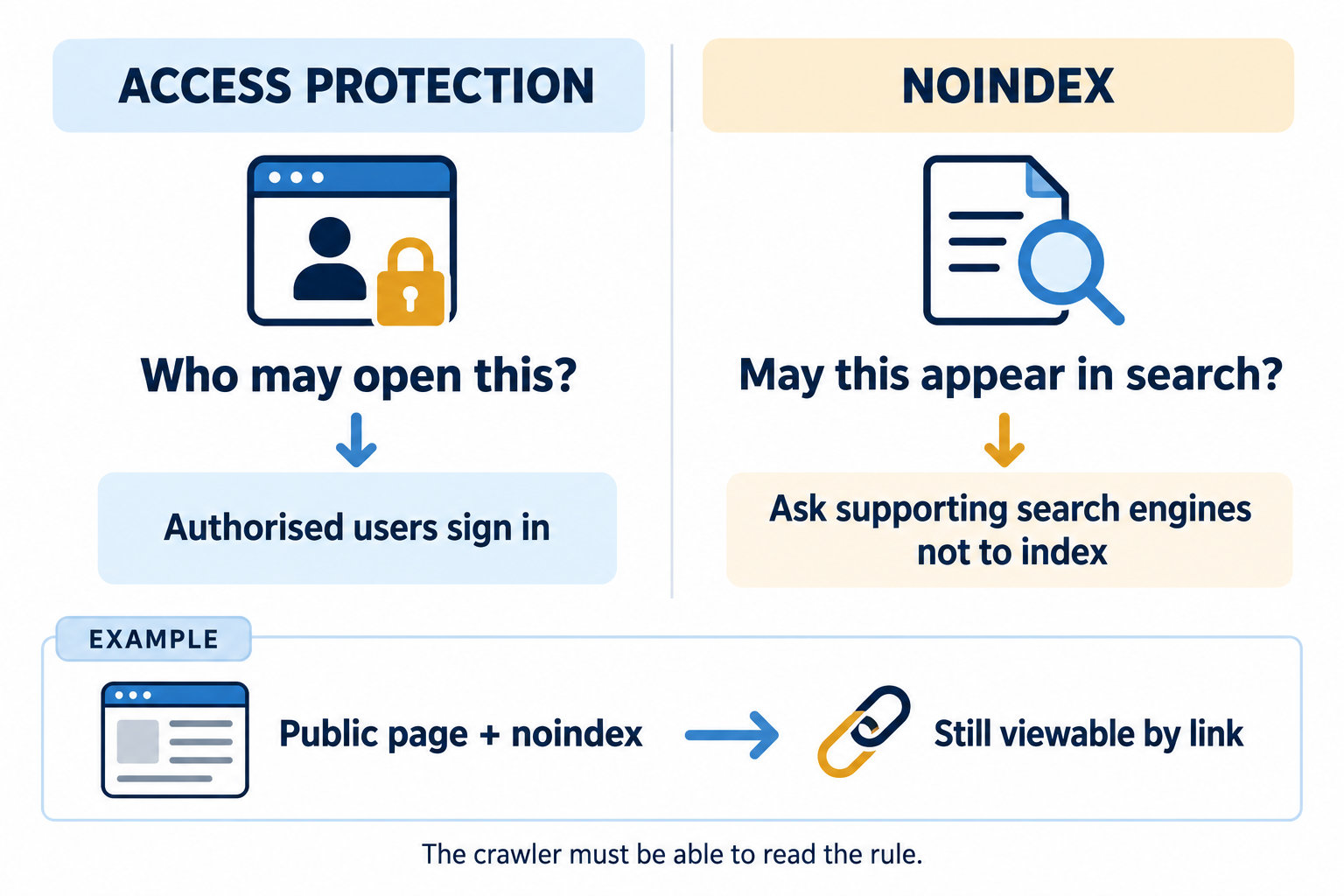
The first question concerns access: who can open the page? An access restriction may require sign-in or another rule the system actually enforces. The second concerns search appearance: may a page reachable by a search engine appear in its results?
Noindex addresses the second question through an instruction for supporting search engines. It does not hide content from a person who has the link. Avoid describing a preview as “private because it uses noindex” when no access restriction has actually been applied.
| Requirement | Question to answer |
|---|---|
| Restricted access | Who may open the preview? |
| Index control | May the URL appear in search? |
| Link sharing | Who may receive a forwarded link? |
| End of review | When does access or the preview end? |
Google describes several controls over content shared with Search, including access protection and noindex. Use each for its intended function rather than treating every control as the same generic sign that something is unpublished.
Do not depend on an obscure address alone
A long preview address may make a link less guessable, but its recipients can still forward or retain it. Links can appear in conversations, browser history or working documents. An unusual folder name is not a rule determining who is allowed to see the contents.
For content that genuinely needs restricted access, discuss the mechanism with the developer. Identify reviewers, how access is granted and how it ends. Where accounts are used, do not confuse giving someone a URL with granting account rights that have not been agreed.
Separate a visual review from a requirement to use real operational data. Layout review can often use appropriate example content without bringing an entire live dataset into the preview. That scope decision does not replace access control when it is still needed, but it clarifies what the review environment must contain.
Understand noindex and crawling together
A search engine needs to read the relevant noindex instruction on a page or response. Blocking crawling with robots.txt can prevent it from seeing that instruction. Adding several rules without understanding their interaction does not establish a more private result.
Google’s noindex documentation explains the crawler-access requirement. If the main goal is to restrict who can view the content, decide access protection first. Index control can be another part of the same plan with a different responsibility.
For a URL previously present in search, a change may not become visible immediately. Record the initial situation and the appropriate steps agreed with the developer. Do not promise immediate removal from every search engine or treat one search result as proof that an entire preview is undiscoverable.
Include linked pages and assets in the discussion
A preview may contain images, downloadable documents and links to other pages. Restricting its main page alone does not establish whether linked files have the same protection. Ask what the chosen mechanism covers, including documents intentionally supplied to reviewers.
Make navigation lead to the intended environment. A reviewer should not unknowingly submit a test request to production because a contact button or form was copied from the live website.
Describe which actions people may try during review. If the discussion covers only copy and pictures, identify the parts that are not yet an operational transaction flow. Context is more useful than expecting reviewers to infer the meaning of every apparently finished button.
Test opening the preview as different people
Try the authorised review flow and the experience of someone without access, using a testing arrangement prepared by the developer. Confirm that a reviewer can reach the needed pages without receiving broader access than intended.
Also consider expired access and old links. A person should understand how to contact the responsible team if review is still needed, rather than encountering an apparently broken page without context. Effective access rules and a clear review experience can be designed together.
When review ends, decide whether the environment closes, remains available for revisions or is replaced by production. Check indexing controls against the purpose of the final environment so a preview rule does not carry over accidentally.
To plan a preview with WebsiteKilat, identify the reviewers, content types and access period. Read the business website security basics as well, connecting access decisions with clear management responsibility while search controls retain their separate indexing role.


